
How to build simple object repository in selenium webdriver using python ubuntu
- vinodkumar545
- Nov 3, 2018
- 1 min read
Updated: Nov 10, 2018
Hello reader, this is my first contribution to automation testing. For web-based automation testing, we always come across different framework (like data-driven, key-word drivern, page object model etc.,), and in that object repository is part of such framework which used to store and maintenance web-element address.
Why do you need an object repository? Well, it's simple. Every application goes through a lot of build/features in time, and during this, there can be changes to web-elements and this causes your test scripts to fail in time. If your web-element address is hardcoded in some line of code, it becomes to difficult to identify and fix it. This is where object repo comes into the picture and makes automation tester work simple.
In this article, I'm going to show a simple object repo for a web-based application to start with. Here, we would be using .ini file to store the web-element address and need to write 5 class to completely run the scripts.
Firstly, lets create a customize standard syntax, as below. (obj_repo.ini)
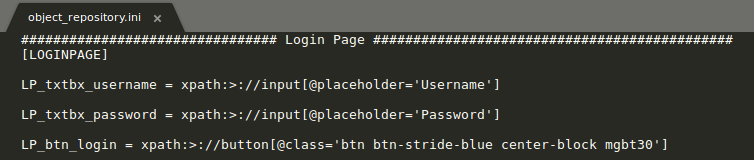
Secondly, let's build method to retrieve locator type & value (obj_property.py)

Thridly, lets create a simple functions on our test base (test_base.py) class

Fourthly, lets create a page object model class as login_page.py

Finally, test_execute.py file where test cases are written. Also, let's place the python class into different set of folder as showm, which follows POM.

To run the scripts, please follow below instructions.
Create a virtualenv and activate it
pip install selenium
pip install configparser
pip install pytest
python -m pytest test_execute.py -vv

I believe this approach of maintianing the object repository is handy for small or medium projects. Hope this helps. Please comment in case of any issues.

Comments