
How to run a single scenario with a range of inputs in selenium webdriver python
- vinodkumar545
- Nov 3, 2018
- 3 min read
Updated: Nov 10, 2018
Hello readers, this is my second contribution to automation testing. As an automation tester, you would always come across the need to test your application behavior across a range of inputs or conditions. For instance, let's state a scenario where, you would like to create user account/submit a form, for say 100 dataset and would want to consider each dataset as a test case, how would you do it? So, this is where I would like to propose a solution.
Let's consider a test scenario to calculate two inputs (like addition, subtraction etc.,) for say 100 or why not 1000's of dataset. I have got this great website called 'Super Calculator', it is used for Protractor Demo, but check it out! So, let's implement the solution on this.
Before we start, I would like you'll to know that I didn't come up with the solution to this problem, believe me, I'm no genius. I got the solution from one of the articles in "http://blog.kevinastone.com/generate-your-tests.html" website written by @kevinastone (It almost took me a month to find this article!). All I had to do is tweak a little bit of code and implement it. So, if you want to know how the scripts actual works, please refer the article, it explains every step in details and code flow. Highly recommend to check it out before going through below solution.
Firstly, let's create test dataset inputs. I always prefer to excel to prepare test data, and we would be using a python package called 'openpyxl' to read the inputs and write the result. Here, I would demonstrate for 4 dataset, but you can keep adding more set in real life scenario.

Below is the step by step code flow.
1. get_inputs() methods collect all the test dataset from the excel and also initialize the webdriver. Please note, scripts would use same webdriver session for all the test execution.
2. add_methods() acts as a decorator for class TestSuperCalculator as a test case
3. decorator() takes a test case and adds a test method i.e., make_method() for each set of input data
4. test_input() calls the super_calculator() method - in this method, driver of the same session would send inputs value in text field, choose operator, click on 'Go' button, capture the output text, validate the output and returns True or False. Once it is completed, make_method() returns test_input name considering it as a single test case.
5. And python setattr() method sets the value of given attribute of an object, it helps in replace/set the test case name and returns it. For more understanding on how setattr() works, please refer "https://www.programiz.com/python-programming/methods/built-in/setattr".
Finally, the code!
Please follow below set of steps to the run the code and get the output.
1. Use python3 version 2. Create a virtualenv and activiate 3. pip install selenium 4. pip install openpyxl 5. pip install pytest 6. pytest test_execute.py -vv ## Note, -vv helps to show the test name (see screenshot below)
Below is the test result and you can see the test_input.__name__ (which are unique, and if 2 data set inputs have same name, then it would considered as 1 test case) that was generate/returned by make_method(). Also, the set of inputs that failed.

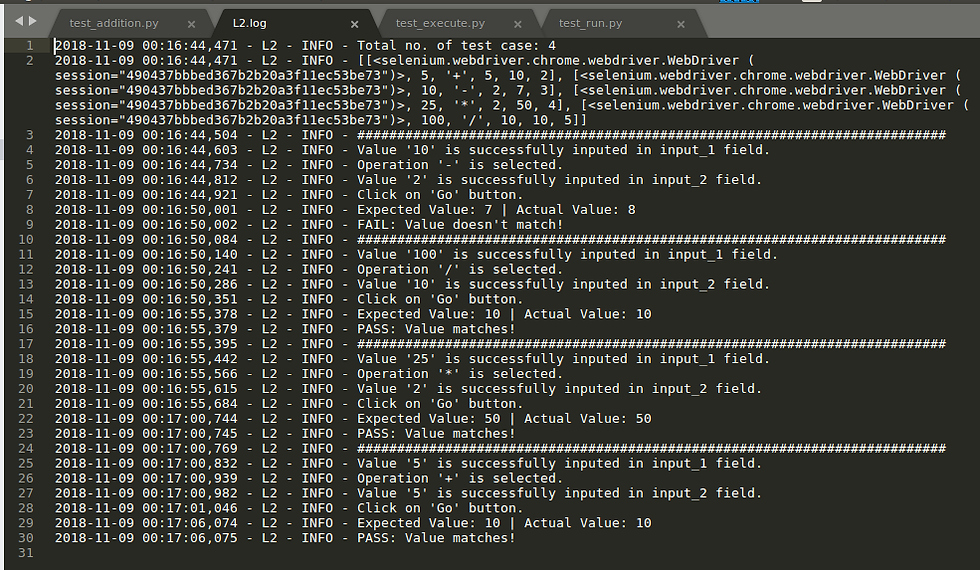
Below the logs record for each test case, which tracks every step of the test case run. You can see there is 4 test case that ran, and one them got failed.
Also, below screenshot show result column updated in the excel test data as well.

That's it. You can use this approach for as much dataset and actually know which got successfully completed or failed! Before exiting from here, I would like you'll to know there are a couple more things that are open challenging for me as well on this approach. So, If any automation experts are reading this, please provide your valuable comments.
1. In this approach, the driver is initialized and is never closed and also workbook is saved for every test case execution. How do you think we can solve it?
2. Also, how can we improve the time execution/performance?
GitHub Repo: https://github.com/Vinodkumar545/Learn_2.git
Any suggestion for the above open challenges is welcome! Please like, comment and share.

Comments